Case Study · Reba Design System · Open Source · v1.0
A design system that treats media as a first-class citizen — not an afterthought.
Every design system I tried to use for melabel, Tansen AI, and pulp.chat was built for SaaS dashboards. None of them knew what a waveform was. None of them had a media player. None of them handled the range of screens that media products actually run on — from a smartwatch to a TV. So I built one.
RDS (Reba Design System) is an open-source design system built to serve multimedia and music-industry products. It ships as a Figma library, a GitHub repository, and an NPM package — all under MIT license. It is currently used as the design and component foundation across melabel, Tansen AI, and pulp.chat, and is published publicly at rds.onl for the broader design and development community.
RDS — Reba Design System · Building the missing layer for multimedia products
Background
Building melabel, Tansen AI, and pulp.chat in parallel surfaced a problem I couldn't solve by adopting an existing design system. Each of those products involves media — audio playback, waveform visualisation, MIDI, streaming controls. Each serves users across a wide range of screen sizes. And each required a shared visual language that could move between a label management dashboard and an artist-facing interface without feeling inconsistent.
I tried to work within existing systems. shadcn/ui is excellent for standard UI primitives. But every available system treated media as a bolted-on feature rather than a core primitive. Audio players were third-party components with incompatible styling systems. Waveforms had no standard abstraction. Responsive breakpoints stopped at mobile and desktop, ignoring the actual range of surfaces a media product runs on — from a watch face showing now-playing, to a TV dashboard showing a label's full release pipeline.
The gap wasn't a missing component or two. It was a missing layer of thinking about what a design system for multimedia products should actually contain. RDS is that layer.
The real problem
The surface problem was missing components. The deeper problem was that every existing design system was built around a mental model of forms and content — inputs, tables, modals, navigation. That mental model produces excellent systems for SaaS products. It produces brittle workarounds the moment a product needs to play audio, display a waveform, coordinate playback state across components, or render meaningfully on a 40mm watch screen.
When I was building the audio player for melabel and the chat interface for pulp.chat simultaneously, I was making the same token decisions twice, solving the same responsive edge cases twice, and writing component logic twice. The cost wasn't just duplication — it was inconsistency. Two products built by the same person, meant to feel related, were visually drifting because they had no shared foundation.
The decision to build RDS wasn't a side project choice. It was a product infrastructure decision. Without it, every new feature built for any of the three products was effectively a custom implementation that accumulated design debt immediately.
“There's no design system that knows what a waveform is. They all want you to treat audio as an edge case in your own product.”
Four systems that didn't exist elsewhere
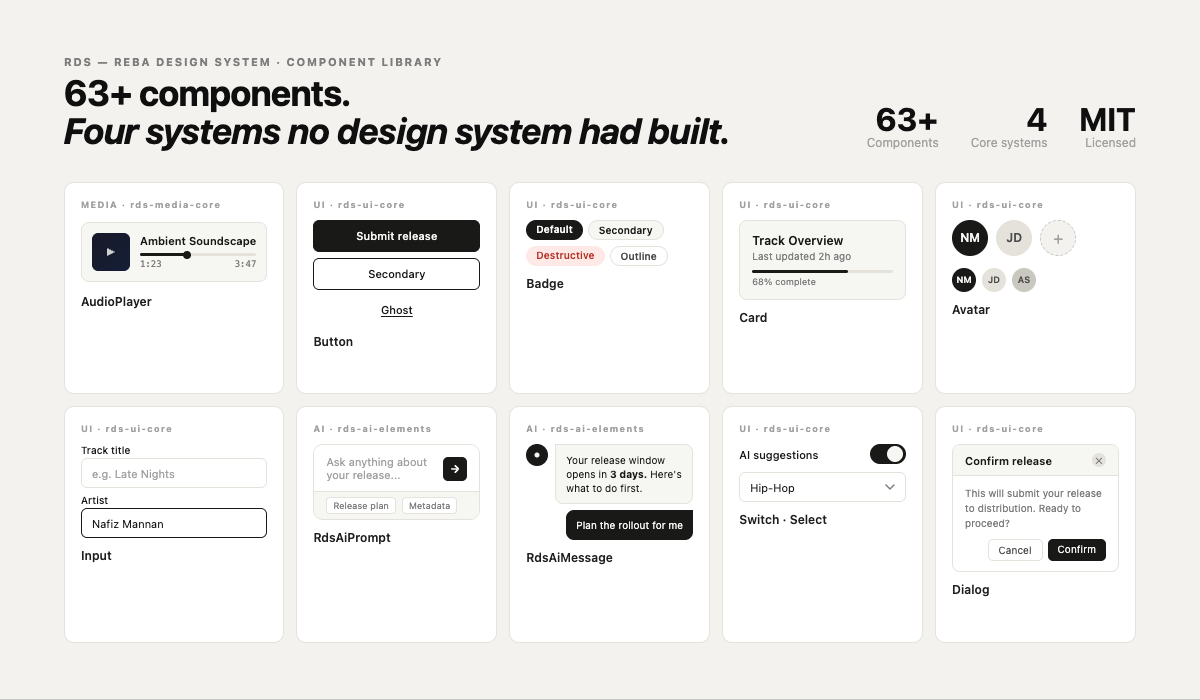
I scoped RDS around four core system problems that no existing design system addressed for multimedia contexts:
Decision 1 — Build on shadcn/ui, not from scratch
The first architectural decision was whether to build RDS from scratch or extend an existing system. Building from scratch would have given complete control but required solving accessibility, keyboard navigation, focus management, and theming before writing a single domain-specific component. That was months of work that shadcn/ui had already done correctly.
The decision to build on shadcn/ui and Radix UI primitives meant RDS inherited solid accessibility foundations, a proven theming system via CSS custom properties, and a component model that developers already understood. The cost was accepting some architectural constraints. The benefit was starting RDS at a higher baseline than most design systems ever reach.
The principle that drove this: RDS should be opinionated about what's domain-specific and unambitious about what's already been solved. shadcn handles buttons and inputs. RDS handles waveforms and MediaCore.
Decision 2 — MediaCore as a shared state layer
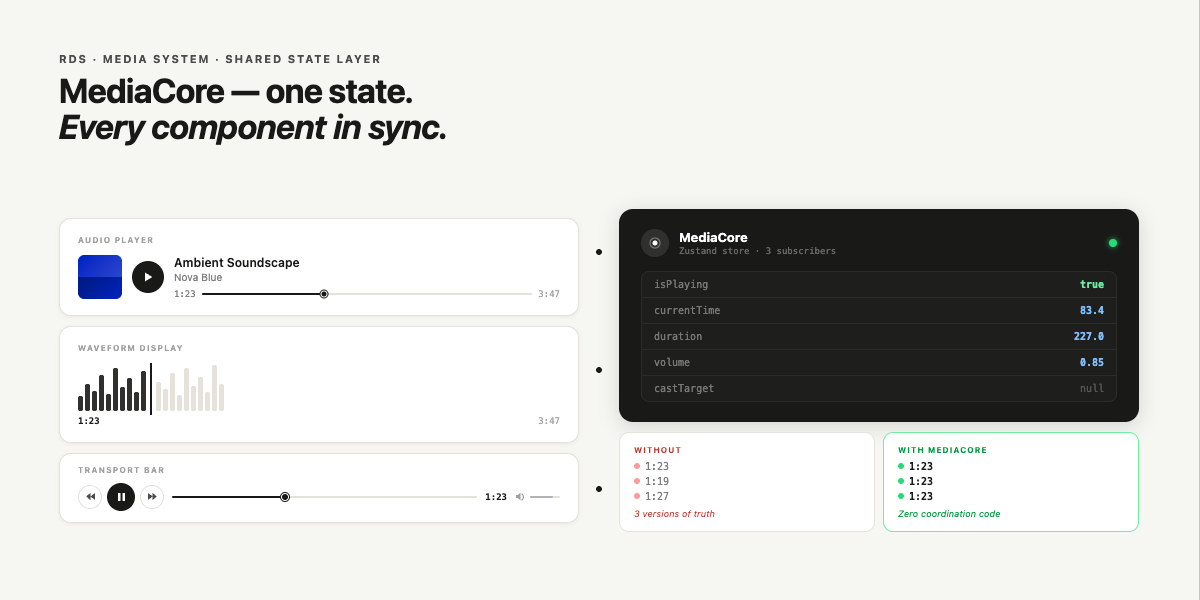
The hardest design problem in the Media System wasn't the UI components — it was state management. A music product might have an audio player in the header, a track list in the main content, a waveform in a detail panel, and a timeline comment thread alongside it. All of these need to know about the same playback state. If each component managed its own state, they'd immediately drift.
MediaCore is a shared playback state primitive that all media components subscribe to. It handles play/pause, seek position, duration, buffering state, and casting targets in a single place. Every audio, video, and MIDI component in RDS reads from and writes to MediaCore rather than maintaining local state. This means you can have a play button in the navigation bar, a seek bar in the main panel, and a waveform in a side drawer — and all three are in sync without any coordination logic in the product code.
This was the decision that took the longest to get right. The first implementation used a React context that caused too many re-renders. The second used a pub/sub pattern that was harder to debug. The final version uses a Zustand store with selective subscriptions — components only re-render when the specific state slice they need changes.
Decision 3 — Breakpoints from watch to TV
Standard design systems define three to five breakpoints that map to phone, tablet, and desktop. Media products in 2024 run on smartwatches showing now-playing information, TV screens showing label dashboards, and everything in between. Designing for only three breakpoints means actively making a choice to ignore two real surfaces.
RDS defines a five-tier breakpoint system built around the actual devices and contexts music products run on:
| Name | Range | Target context | Primary use case |
|---|---|---|---|
| watch | ≤ 320px | Smartwatch / wearable | Now-playing, transport controls, notifications |
| mobile | 321–768px | Phone | Full artist interface, release management, streaming |
| tablet | 769–1024px | Tablet / small laptop | Split-view, catalog browsing, studio companion |
| desktop | 1025–1920px | Laptop / monitor | Label dashboard, analytics, full workflow |
| tv | 1921px+ | TV / large display | Roster overview, performance dashboards, live displays |
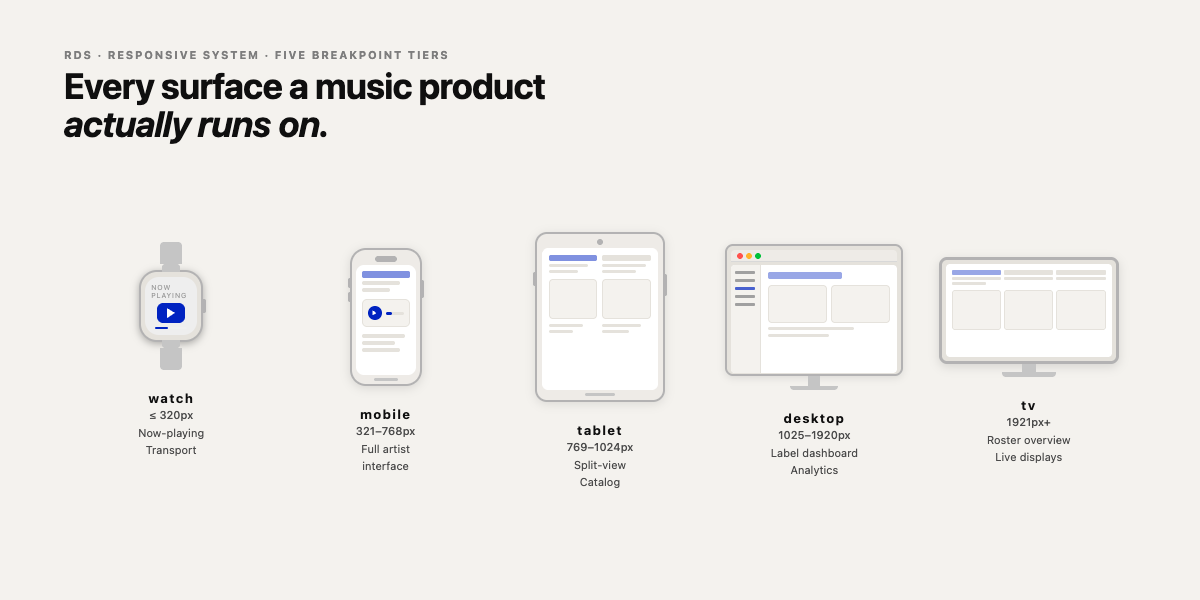
Every RDS component is designed and tested across all five tiers. Not just “it doesn't break” — genuinely designed for the use case at each scale. A transport control on a watch face shows only essential controls. The same component on a desktop shows waveform, chapter markers, and cast controls.
Decision 4 — AI-friendly by design
One of the three target user types for RDS is what the documentation calls “vibe coders” — developers using AI tools like Claude, Cursor, and Copilot to build products without deep component library expertise. This isn't a fringe use case. It describes how a growing proportion of product builders actually work.
AI-friendliness in RDS means predictable naming, self-documenting prop APIs, and documentation written so that an LLM can generate correct usage from a description. Component names are verbose over clever — AudioPlayer not AP, ChatPanel not ConvoContainer. Props follow consistent patterns across all components.
This decision had a secondary benefit: it also made RDS easier for human developers new to the system. The same properties that make a component predictable to an AI make it predictable to a person encountering it for the first time.
Decision 5 — What to include in v1.0 and what to defer
A design system that ships too little isn't useful. One that ships too much isn't maintainable. The v1.0 boundary I drew: ship complete systems, not partial coverage. A half-built Media System with an audio player but no MediaCore state layer would have been worse than shipping nothing — products built on it would have had to work around it. So the rule was: if a system is included, it ships with its full architecture. If it can't, it waits.
This is why Patterns and Templates are marked as “Coming Soon” rather than shipped with placeholder implementations. The atomic components are complete. The composition layer needs more usage data from the real products before the right abstractions are clear. Shipping premature Patterns would have locked in the wrong decisions.
Three products, one design language
The open source decision
RDS is MIT-licensed and publicly documented at rds.onl. This wasn't a default choice — it was deliberate. The case for open-sourcing RDS was straightforward: a design system is most useful when the community around it grows.
The more interesting argument for open sourcing was strategic. RDS's moat isn't secrecy — it's the domain knowledge baked into the component decisions. Anyone can fork the repository. Replicating the understanding of why MediaCore is architected the way it is, or why the watch breakpoint is treated as a first-class surface rather than an edge case, requires building the products that revealed those decisions. The code is the output. The thinking is the asset.
Outcomes
The metric that matters most is the one hardest to quantify: the rate at which new features in any of the three products require new component work. Before RDS, every significant UI addition required either a custom implementation or a workaround around an existing system's constraints. After RDS, most new features are assembly — combining existing RDS components in new configurations. That's the compound return on the initial investment.
Technical stack
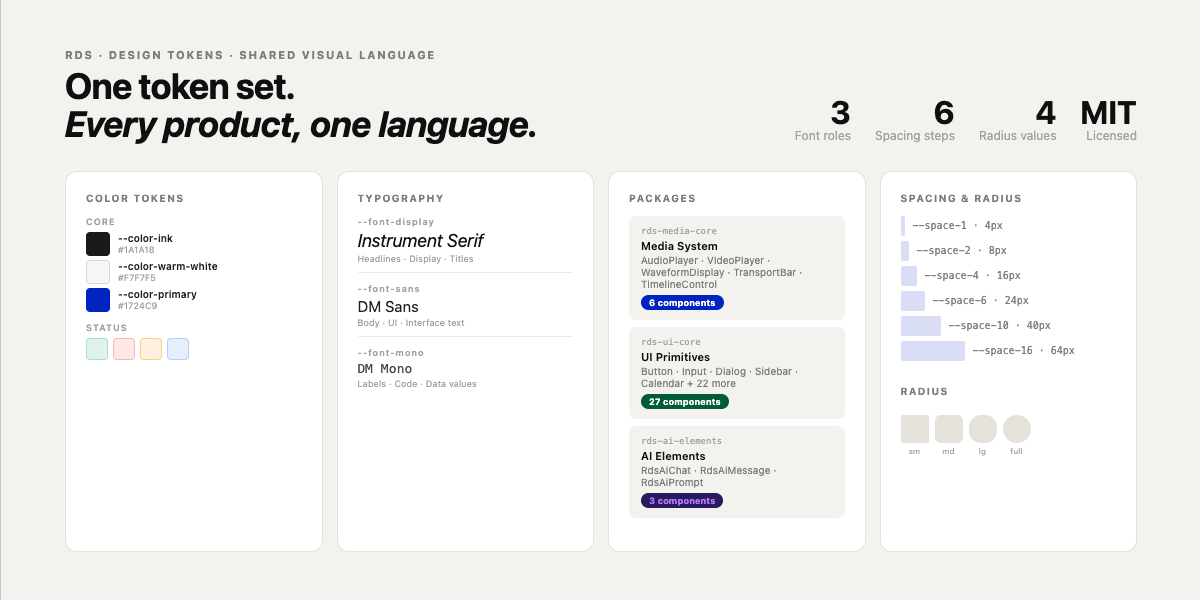
The full system is documented and live at rebadesign.systems.